deactivate not available services

Viewed 0

Hello,

I have a problem with a Service its the "VeeamVssSupport" service. This Service is automatically installed by Veeam during the backup of a server. After the backup is done Veeam deletes this Service.

The Problem is the server Monitor detects this Service as new and not running. Then it sends a mail to the admin.

Is it possible to make a global setting to ignore this service?

br Henrik

3 Answers

Hi Mike,

There is a few things that you can do...

  1. Monitor Templates - if you use templates you will be able to control make monitor setting in one monitor and the change will populated to all of the servers using those templates.
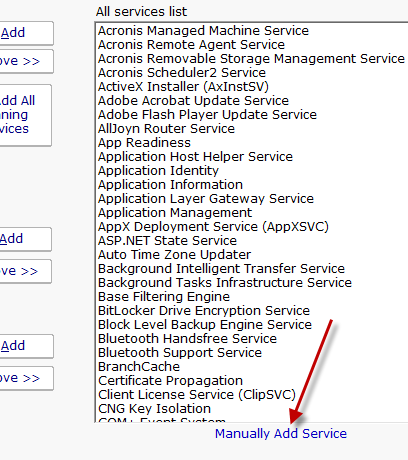
  2. Ignore Service - You could move the "VeeamVssSupport" service to the Services to ignore in your service monitor. If you need to do this for lots of servers at the same time you can use Bulk Config. If the service is not listed when you go to add it to the ignore list you can manually add the service. There is a link in the Service Monitor under the All Service List that will allow you to manually add a service.

My suggestion is to use Templates, this is a new feature in version 6.

Thanks
Quinn

Please make sure to mark your questions accepted when you have your answer by clicking the gray check mark to the left of the answer.

Hello Quinn Thank you. I think that is the solution. I did not see the "Manually Add Service.

Mike,

There should be a link called "Manually Add Service" under the All Servers list. Here is an image...

alt text

Thanks
Quinn

Please make sure to mark your questions accepted when you have your answer by clicking the gray check mark to the left of the answer.

Related