I have Several SNMP Monitors that query values, but with no alerts, it's for reporting.
However, I'm not able to figure out how to get those values into Source Data in the Reporting tool.
 TLI_JR
24
TLI_JR
24
I have Several SNMP Monitors that query values, but with no alerts, it's for reporting.
However, I'm not able to figure out how to get those values into Source Data in the Reporting tool.
Hi TLI_JR,
Would you please send me a screenshot showing the monitor's setting? Then open one of the counters that you don't have a threshold for and click on the Get Value button. Once the value appears please send me a screenshot of that too. I trying to verify that data is being collected.
Thanks
Quinn
Please make sure to mark your questions accepted when you have your answer by clicking the gray checkmark to the left of the answer.
TLI_JR,
The monitor is collecting data as you can see on the Server Status report. Those values collected should be available in Reports for you. Please go to Reports -> Generate Ad Hoc Report. Then on the right side of the console find and select the SNMP Objects Value. Then click on the Source Data tab, can you find server/monitor and then the objects listed under the monitor?
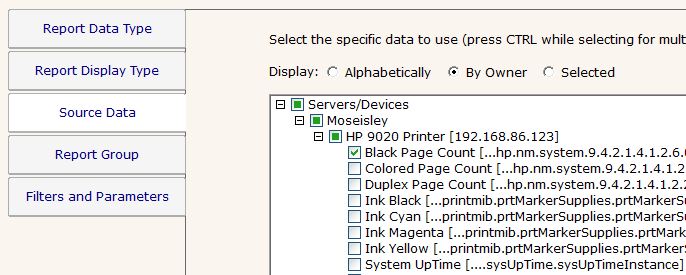
Thanks
Quinn
Please make sure to mark your questions accepted when you have your answer by clicking the gray checkmark to the left of the answer.
TLI_JR,
What version of PA Server Monitor are you running?
Thanks
Quinn
Please make sure to mark your questions accepted when you have your answer by clicking the gray checkmark to the left of the answer.
TLI_JR,
Would you also send us the log files. Open the Console and go to System Settings. In this menu click on the FTP Logs to Support button.
Thanks Quinn
Please make sure to mark your questions accepted when you have your answer by clicking the gray checkmark to the left of the answer.
okay, I think that's done I used "3485-reports-snmp-objectsobject-values-no-source-data" as the request ID
TLI_JR,
Thank you for the log files. But we weren't able to find any errors or database issues in these files. The server must being monitored from a Satellite. Would you please send those logs?
Open the Configure PA Server Monitor Satellite and click on the Advanced button. You will find the FTP Logs to Support button there.
Thanks Quinn
Please make sure to mark your questions accepted when you have your answer by clicking the gray checkmark to the left of the answer.
TLI_JR,
Okay, we understand the problem with the SNMP monitor. Everything you're monitoring is a string. Most of those strings don't change over time, maybe a few but not very often. The SNMP monitor is designed to record numeric values to the database for reports/charts/etc. Since we can't chart string values they don't get saved.
So with that said, how would you like to get reports on these values, what do you want to see in the report?
Thanks Quinn
Please make sure to mark your questions accepted when you have your answer by clicking the gray checkmark to the left of the answer.
The end goal is two-part. We have clients with multiple devices and it would be nice to have one report for them rather than per device as the summary report does now. Additionally, using the schedule reports to save the report locally as instructed in http://support.poweradmin.com/osqa/questions/3484/status-report-save-to-s3-or-local-folder
TLI_JR,
As it turns out that SNMP monitor is only able to collect number values. There is another way to pull SNMP string values by using the Inventory monitor.
First you will need to the InventoryList.txt file. That file lets you define OIDs to be pulled in and used to populate Inventory fields which could then be reported on. The instructions are listed in the top of the text file.
Look in C:Program FilesPA Server MonitorInventoryList.txt
Once you have that entered and saved restart your Console. For each server make sure that you add and Inventory monitor. Once the monitor has had time to run and collect data you should be about to run Inventory Report to show all of those values.
You can even edit the settings for the System Details section of the Server Status Report to show values in that section of the report.
Hope this works for you. It's not using the SNMP monitor but the Inventory monitor is pulling those IOD numbers and values.
Thanks Quinn
Please make sure to mark your questions accepted when you have your answer by clicking the gray checkmark to the left of the answer.
Data Type Name, Description. INTEGER. Used to specify a value whose range may include both positive and negative numbers.Some SNMP management applications list only the object names and their corresponding values in the SNMP traps. Whether or not your SNMP ...Simply loading a new MIB into your NMS does not necessarily allow you to retrieve the data/values/objects, etc., defined within that MIB.In the Simple Network Management Protocol (SNMP), OID means an "Object Identifier." To define OID, it's an address used to uniquely identify managed devices and their statuses. To get SNMP data from your devices you can use command line tools or graphical tools. In the category of graphical tools, there are a number of different options. Searching for "SNMP browser" in Google or your favorite search engine will turn up a number of options, some free and some paid.

 link:
link: